

Desktop Sync Client
Cloudreve provides an official desktop sync client for Windows, enabling seamless bidirectional file synchronization between your local machine and Cloudreve server.

Features
- Real-time bidirectional synchronization: Changes on either side are automatically synced
- On-demand file access: Files are downloaded only when accessed, saving local storage
- Windows Explorer integration: Native context menus, thumbnails, and status indicators
- Multiple storage provider support: Works with all storage policies configured on your Cloudreve server
System Requirements
- Windows 10 version 1903 (build 18362) or later
- A Cloudreve Pro server instance
Download

Source code: GitHub
Placeholder Files
The desktop client uses the Windows Cloud Files API to create "placeholder" files. These are special files that appear in Windows Explorer like regular files but may not have their content stored locally. This allows you to browse your entire cloud storage without consuming local disk space.
File States
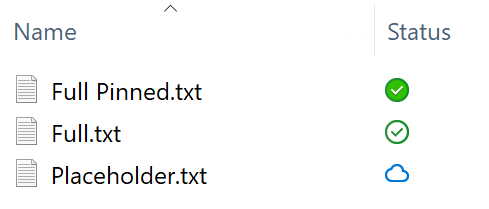
Placeholder files have three main states, indicated by status icons in Windows Explorer:
| State | Icon | Description |
|---|---|---|
| Online-only | Cloud icon | File metadata is available locally, but file content remains on the server. The file will be downloaded when you open it. |
| Locally available | Green checkmark | File content has been downloaded and is available locally. The system may automatically free up space by removing local content when storage is low. |
| Always available | Solid green circle with checkmark | File is pinned to always keep local content. The system will not automatically remove local content. |
Managing File States
You can change a file's state by right-clicking it in Windows Explorer:
- Free up space: Removes local content, keeping only the placeholder (Online-only)
- Always keep on this device: Pins the file to ensure content is always available locally
File Synchronization
Real-time Change Detection
Under normal operation, the desktop client receives file change notifications in real-time through Server-Sent Events (SSE). When files are created, modified, renamed, or deleted on the server (by web interface, mobile app, or other clients), your local view updates immediately.
Troubleshooting
If real-time updates are not working:
- Check if your web server (Nginx, Apache, etc.) has buffering disabled for SSE endpoints
- Ensure reverse proxy timeout settings are long enough for persistent connections
- Verify that the Cloudreve server is accessible and responding normally
Force Sync
In rare cases where synchronization state becomes inconsistent (e.g., after network interruptions or system crashes), you can trigger a manual full synchronization:
- Right-click on a file or folder in Windows Explorer
- Select Cloudreve > Sync now
This will reconcile the local state with the server, resolving any discrepancies.
Conflict Resolution
When a local file version conflicts with the cloud, the client will pop up a notification asking how to resolve the conflict:
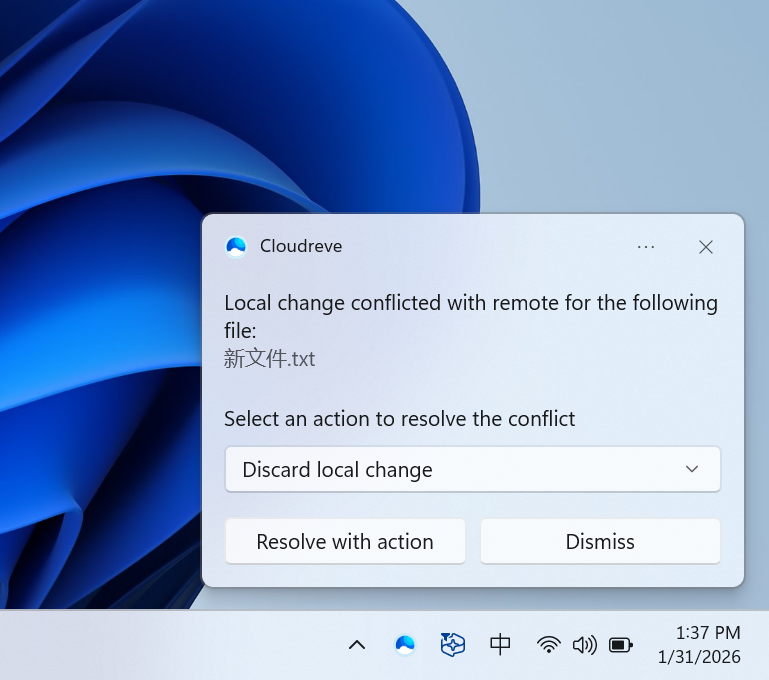
You can right-click on the conflicting file and select Cloudreve > Resolve conflict to re-open the conflict resolution dialog.
Comparison with WebDAV
While Cloudreve also supports WebDAV for file access, the desktop sync client offers significant advantages:
| Feature | Desktop Client | WebDAV |
|---|---|---|
| System requirements | Windows 10 1903+ | Any OS with WebDAV client |
| On-demand files | Yes (placeholder files) | No (must download entire file) |
| Real-time sync | Yes (SSE push) | No (manual refresh required) |
| Upload method | Direct to storage provider | Must relay through Cloudreve server |
| Chunked upload | Yes (parallel chunks) | No (single stream) |
| Large file support | Excellent | Limited by WebDAV client |
| Offline access | Pinned files available offline | Cached files only |
| Explorer integration | Full (status icons, context menus) | Basic (mounted drive) |
When to use WebDAV
WebDAV remains useful for:
- Non-Windows platforms (macOS, Linux, mobile)
- Applications that require direct file path access
- Simple file access without sync requirements